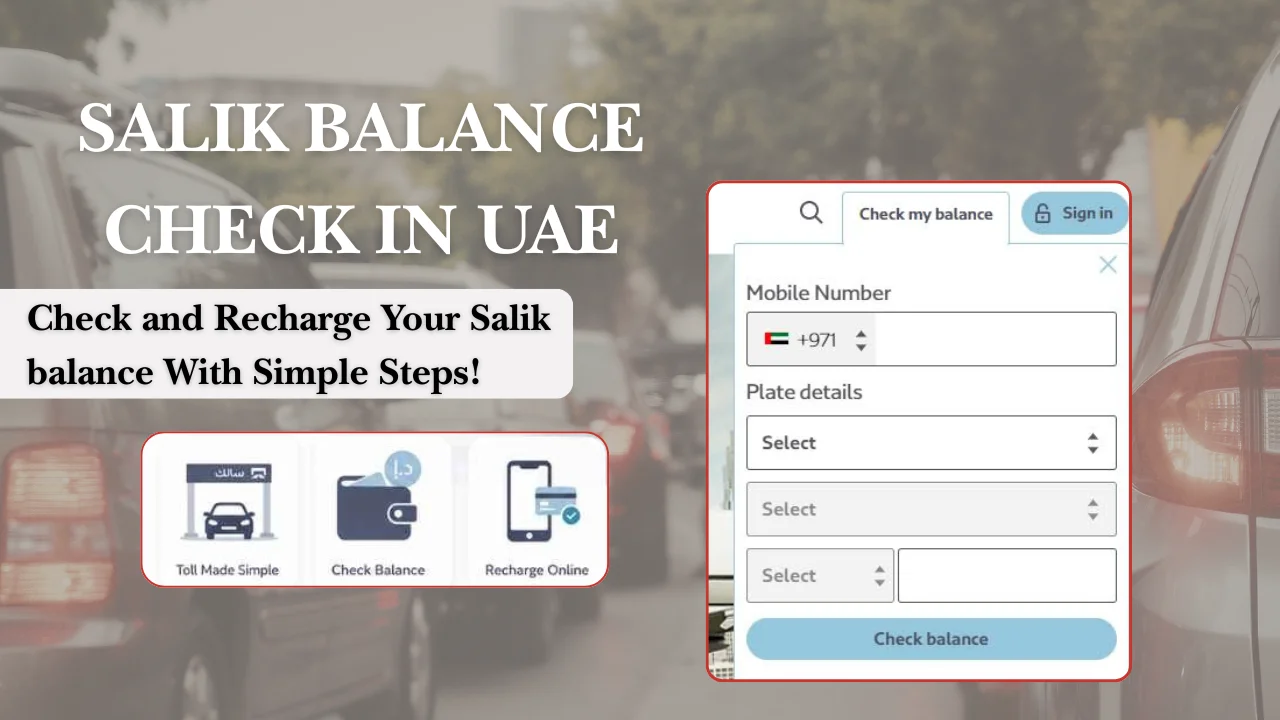
Checking your Salik balance regularly helps Dubai drivers avoid failed toll payments and possible violations. You can check your balance through the official Salik website, Smart Salik App, RTA Dubai App, customer service, or by using vehicle details through the official balance inquiry option.
What is Salik and why should you check your balance regularly
Salik is Dubai’s electronic toll collection system that automatically deducts toll charges when a vehicle passes through Salik gates. Every registered vehicle needs an active Salik tag and enough balance to cover toll trips.
Checking your balance often helps you:
- Avoid driving with insufficient funds.
- Prevent unexpected account issues during trips.
- Track toll deductions and recent journeys.
- Recharge before your balance becomes too low.
A low Salik balance does not always mean you will receive an immediate warning. Drivers are responsible for keeping enough funds in their accounts and checking their balance through available Salik channels.
Quick Salik balance check options:
| Method | Information needed | Best for |
| Salik website | Account number and PIN or vehicle details | Regular users |
| Smart Salik App | Login details | Daily drivers |
| RTA Dubai App | Linked account | RTA app users |
| Customer service | Account details | Users needing help |
| Vehicle details check | Registered plate information | Users without login access |
How to check Salik balance online
The easiest way to check Salik balance online is through the official Salik website. You can log in to your account or use the available balance inquiry option with vehicle information.
Checking balance through the online portal
To check your balance through the Salik website:
- Visit the official Salik website.
- Select the balance inquiry or account login option.
- Enter your account number and PIN.
- Submit the details.
- Your available balance will appear on the screen.
Registered users can also view account activity, recharge their account, and check statements through the online portal.
Checking balance using vehicle details
Salik also provides a balance check option using registered vehicle details. This is useful if you do not remember your account number.
You normally need:
- Vehicle emirate.
- Plate category.
- Plate code.
- Vehicle plate number.
- Registered mobile number.
After entering the correct details, the available Salik balance appears on the screen.
Information required to check your balance
The information needed depends on the method you choose.
For online account login:
- Salik account number.
- PIN.
- Registered mobile number.
For vehicle-based checking:
- Vehicle plate details.
- Registered phone number.
For app access:
- Salik online username and password.
If you cannot access your account, customer support can help with account-related problems.
Ways to check Salik balance through mobile and other methods
Dubai drivers have several options to check their Salik balance without using a computer. The Smart Salik App and RTA Dubai App allow users to manage their accounts from a mobile phone.
Checking balance through the mobile application
The Smart Salik App is one of the quickest ways to check your balance.
Steps:
- Download the official Smart Salik App.
- Sign in with your Salik account.
- Open the account dashboard.
- View your available balance.
The app also allows users to recharge accounts, check trips, view statements, and manage linked vehicles.
Checking balance through SMS
Salik users may receive account notifications through SMS on their registered mobile number. However, SMS alerts should not be your only balance-check method because drivers remain responsible for maintaining enough funds.
If you need a balance update and cannot access online services, using the official app, website, or customer service is usually the safer option.
Checking balance through customer support
You can check your Salik balance through the 24-hour Salik self-service number:
800 Salik (72545)
Follow these steps:
- Call 800 Salik.
- Select your preferred language.
- Choose the account login option.
- Enter your account number and PIN.
- Your balance will be provided.
This option is useful when you have login problems or need help with account information.
Checking balance at kiosks and service locations
Salik balance management is mainly available through digital channels such as the website, Smart Salik App, and RTA services. Physical service locations are less commonly used for simple balance checks.
For most drivers, online methods are faster because they provide instant access without visiting a location.
How to check Salik balance without account details
You can still check your Salik balance if you cannot remember your account number. The official balance inquiry option allows users to use registered vehicle information.
Options if you forget your account number or PIN
If you forget your Salik login details:
- Try the account recovery option on the official website.
- Use the Smart Salik App recovery options.
- Contact Salik customer support at 800 Salik (72545).
You should avoid creating a new account because your vehicle and toll history are connected to your existing Salik account.
Checking balance using available vehicle information
Vehicle information can help you check your balance without logging in.
Prepare:
- Vehicle plate emirate.
- Plate number.
- Plate code.
- Registered mobile number.
Enter the details through the official Salik balance inquiry page to view the available balance.
How to recharge your Salik balance after checking it
You can recharge your Salik account online through the official website, Smart Salik App, RTA Dubai App, banking channels, and other approved payment methods. The minimum recharge amount is AED 50, and recharge amounts must be in multiples of AED 50.
Online recharge options
After checking your balance, you can add funds using these options:
| Recharge method | How it works |
| Salik website | Log in to your account, choose recharge, and pay online |
| Smart Salik App | Open the app, select recharge, enter amount, and complete payment |
| RTA Dubai App | Recharge through linked Salik services |
| Bank channels | Use supported banking apps, ATMs, or cash deposit machines |
| Recharge card/e-voucher | Enter the recharge details through approved channels |
For online payments, users can usually pay by credit card or through supported banking services. Some banks also provide auto top-up options, which add money automatically when your balance reaches a selected level.
Minimum balance and recharge timing
Salik does not require users to maintain a fixed monthly balance. However, keeping enough funds before driving through toll gates helps avoid account problems.
Important recharge details:
| Item | Details |
| Minimum recharge amount | AED 50 |
| Maximum recharge amount | AED 50,000 per transaction |
| Recharge amount format | AED 50, AED 100, AED 150, and other multiples of AED 50 |
If your balance becomes insufficient after passing through a toll gate, Salik gives a grace period of five working days to recharge the account. If you do not recharge within this period, a violation fee of AED 50 per day can apply if trips were made.
Salik balance check methods comparison: which option is easiest
The best Salik balance check method depends on how often you drive and whether you have access to your account details.
Online vs offline checking methods
| Method | Speed | Login required | Best use |
| Smart Salik App | Very fast | Yes | Daily drivers |
| Salik website | Fast | Usually yes | Account management |
| Vehicle details inquiry | Fast | No account login in some cases | Forgotten account details |
| Customer service | Medium | Account verification needed | Account problems |
| Physical locations | Slower | Depends on service | Limited situations |
For most UAE residents, the Smart Salik App is the easiest option because it keeps balance, trips, and account services in one place.
Fastest method for regular users
Regular Dubai drivers should use the Smart Salik App because they can:
- Check balance anytime.
- Recharge instantly.
- View toll transactions.
- Manage linked vehicles.
- Receive account notifications.
The app is useful for people who pass through Salik gates often because they do not need to enter account details every time.
Best option for residents, visitors and rental car users
The best method changes based on the user type:
| User type | Recommended option |
| Dubai residents with their own car | Smart Salik App |
| Users who rarely drive | Website balance check |
| Visitors using rental cars | Check with rental company and keep payment details available |
| Users who forgot login details | Vehicle information check or customer support |
Rental car users should confirm how Salik charges are handled before driving. Some rental companies manage toll payments separately and add charges after the rental period.
Common Salik balance issues and solutions
Most Salik problems happen because of delayed recharge updates, incorrect login details, or account information issues.
Recharge completed but balance not updated
If your recharge is successful but the balance does not change:
- Wait a short time and refresh your account.
- Check your payment confirmation.
- Log out and log back into the app.
- Contact Salik support if the issue continues.
Keep your recharge receipt or payment confirmation because it may be needed for verification.
Unable to check balance online or through SMS
If you cannot access your balance:
- Check that your account details are correct.
- Confirm that your registered mobile number is active.
- Try the Smart Salik App instead of SMS.
- Contact Salik customer support for account recovery.
The Salik customer service number is 800 SALIK (72545).
Incorrect deductions or transaction issues
If you notice an unfamiliar deduction:
- Open your Salik account.
- Check your trip history and transactions.
- Compare the deduction details with your travel route.
- Contact Salik support if the transaction appears incorrect.
The Smart Salik App provides transaction history, which helps users review account activity.
Tips to avoid Salik fines and low balance problems
Checking your Salik balance before important trips can help you avoid payment issues.
Recommended balance to maintain
There is no official fixed balance requirement for every driver. A practical approach is to keep enough credit for your normal weekly trips.
For example:
- Daily Dubai commuters should check their balance regularly.
- Occasional drivers can check before highway trips.
- Frequent airport or business route users should maintain extra credit.
Your ideal balance depends on how often you pass through toll gates.
Setting reminders for balance checks
You can avoid low balance problems by:
- Checking your balance once a week.
- Enabling app notifications.
- Setting a calendar reminder before regular travel days.
- Using auto top-up if available.
What happens when Salik balance is insufficient
If your Salik account does not have enough money when you pass a toll gate:
- The trip is recorded.
- You get five working days to recharge.
- The toll amount is deducted after recharge.
- A violation fee may apply if you do not recharge within the allowed period.
Frequently asked questions (FAQs)
How can I check my Salik balance online?
You can check your Salik balance through the official Salik website by logging into your account or using the available vehicle information inquiry option.
Can I check Salik balance using my vehicle number?
Yes, you can check Salik details using available vehicle information through official Salik services. The exact information required depends on the inquiry option available for your account.
How often is Salik balance updated?
Salik balance updates after account transactions such as toll deductions and successful recharges. If your balance does not update after payment, check your payment status and contact support if needed.
Can I check Salik balance without login details?
Yes, you may be able to use vehicle-related information through official Salik inquiry options. If you cannot access your account, use account recovery or contact customer support.
What happens if Salik balance reaches zero?
If your balance reaches zero and you pass through a toll gate, you must recharge within the allowed grace period. Otherwise, violation charges may apply.
How can I recharge Salik quickly?
The quickest options are the Smart Salik App and official online recharge channels because they allow digital payment without visiting a service location.
Conclusion
A Salik balance check takes only a few minutes and helps Dubai drivers avoid payment issues during daily travel. The Smart Salik App is the easiest option for regular users, while the website and vehicle inquiry methods are useful alternatives.
Keeping your balance updated, checking transactions regularly, and using reminders can help you manage your Salik account without problems. For the latest account services and updates, always use the official Salik website or approved RTA channels