Checking your nol card balance is easy in Dubai. You can view your available balance through the official RTA website, the nol Pay app, ticket machines at metro stations, and other approved channels.
A balance check helps you know if your card has enough credit before using Dubai Metro, buses, tram, marine transport, parking services, or other nol-enabled payments.
How to check your nol card balance
You can check your nol card balance using online and offline methods. The best option depends on whether you have internet access, a smartphone with NFC support, or access to an RTA machine.
| Method | What you need | Best for |
| RTA online balance check | nol Tag ID | Quick balance check from anywhere |
| nol Pay app | Smartphone and supported NFC feature | Regular commuters |
| Metro machines | Physical nol card | People at stations |
| Authorized outlets | Physical card | Quick local checks |
Check your balance online
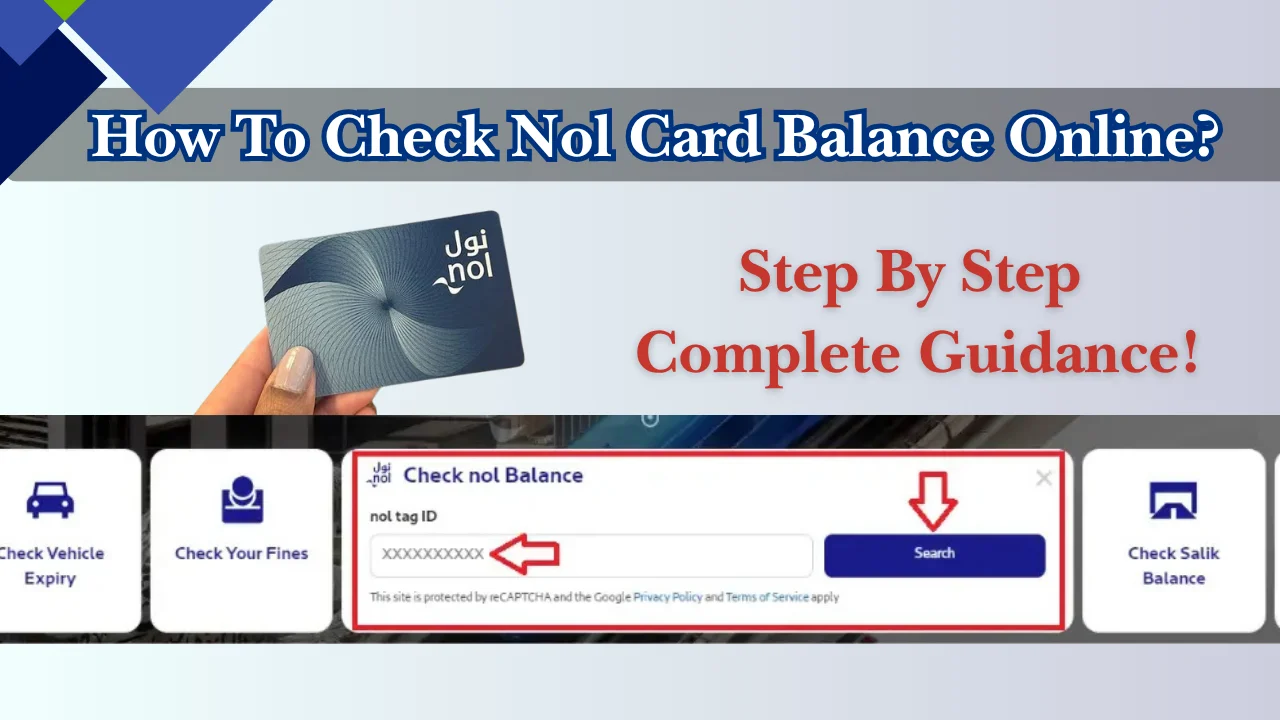
You can check your nol card balance online through RTA services. You need your nol card details, especially the Tag ID printed on the card.
Steps:
- Visit the official RTA website.
- Open the nol card balance enquiry service.
- Enter your nol Tag ID.
- Submit the request.
- View your available balance and card details if available.
This method is useful for residents and visitors who want to check their balance before travelling.
Check balance using a mobile app
The nol Pay app is the official RTA mobile application for managing nol card services. It allows users to check balance, top up cards, view card information, and manage selected nol services.
To check your balance:
- Download the nol Pay app.
- Open the app and sign in if required.
- Add or scan your nol card.
- Use the NFC feature if your phone supports it.
- View your balance information.
The app is useful for daily commuters because it also supports card recharge and card management features.
Check balance through SMS
Checking your nol card balance through SMS may be possible for some users, but availability depends on the services linked to your card and the current options provided by Dubai’s Roads and Transport Authority (RTA). SMS features can change over time, so they may not be available for every nol card or mobile network.
If SMS balance inquiries are supported, you will usually need to use the mobile number registered with your nol account and follow the format provided by the RTA. Standard SMS charges from your mobile operator may apply.
Before using this method, keep these points in mind:
- Confirm that your nol card or account is eligible for SMS services.
- Make sure your mobile number is registered, if required.
- Follow the latest SMS format and destination number published by the RTA.
- Allow a few moments for the balance reply to arrive.
If the SMS service is unavailable or you do not receive a response, you can check your balance through the RTA website, the nol Pay app, ticket vending machines, metro station ticket offices, or authorized retail outlets.
Because SMS services and instructions may change, always verify the latest process through the official RTA website before relying on this method.
Check balance at metro stations and ticket machines
You can check your nol card balance at Dubai Metro stations using ticket vending machines and other available RTA devices.
Steps:
- Visit a metro station.
- Place your nol card on the card reader
- Select the balance enquiry option.
- Your available balance will appear on the screen.
This option is useful if your phone does not support NFC or you do not have internet access.
Check balance at authorised outlets
Some authorized nol outlets can help you check or recharge your card. These locations include approved sales agents and selected retail points.
Before visiting an outlet, confirm that it provides nol services because not every shop supports balance checks.
What is a nol card and how does it work?
A nol card is a rechargeable smart card used for Dubai public transport and selected payment services. It allows passengers to pay fares without using cash.
The card works by storing credit that is deducted when you tap in and tap out during travel.
Uses of a nol card in daily life
A nol card can be used for:
- Dubai Metro journeys
- Dubai Tram travel
- Public buses
- Marine transport services
- Parking payments
- Selected retail payments
RTA introduced nol cards as a unified payment method for Dubai transport services.
Where you can use a nol card in Dubai
You can use nol cards across Dubai’s public transport network, including:
- Metro stations
- Tram stations
- Bus routes
- Marine transport stations
- Parking machines
Some registered nol cards can also be used at approved retail locations.
Minimum balance required for travel
You need enough balance on your nol card before starting your journey. The required amount depends on your trip zones and fare type.
RTA recommends checking your balance before travelling, especially if you use public transport regularly.
A low balance can prevent your card from being accepted at entry gates or validators.
Types of nol cards available in the UAE
Dubai RTA provides different nol card options for residents, visitors, and passengers who need special travel benefits. The right card depends on how often you travel and whether you need a personalized card.
| Nol card type | Price | Best for |
| Silver card | AED 25 (includes AED 19 balance) | Regular commuters |
| Gold card | AED 25 (includes AED 19 balance) | Passengers who use Gold Class cabins |
| Red Ticket | AED 2 | Short-term visitors |
| Personal Blue card | AED 70 (includes AED 20 balance) | Registered users and eligible discounts |
Silver card for regular travellers
The Silver nol card is the most common option for daily commuters. It can be used on Dubai Metro, buses, tram, marine transport, and other approved nol services.
The card is valid for 5 years and can hold up to AED 1,000 for anonymous cards and AED 5,000 for registered cards.
It is suitable for people who travel regularly but do not need personal identification or special discounts.
Gold card for premium travel
The Gold nol card works like the Silver card but gives access to the Gold Class cabin on Dubai Metro and Tram.
Gold Class fares are charged at double the regular fare. The card price is AED 25, including AED 19 stored balance.
This card is useful for passengers who prefer travelling in the Gold Class cabin.
Red ticket for short-term visitors
The Red Ticket is designed for tourists and occasional users. It is a paper-based ticket that can be loaded with travel products.
The Red Ticket costs AED 2 and can be used for up to 10 journeys or 5 daily passes, depending on the selected option.
Visitors who only need public transport for a short stay often choose this option.
Blue card for personalised users
The Blue nol card is a registered personal card linked to the user’s details. It provides better protection because the balance can be recovered if the card is lost or stolen.
The card costs AED 70, including AED 20 credit. It is valid for 5 years.
Personal cards are also required for concession fares such as student, senior citizen, and People of Determination categories.
Special cards for students, seniors, and eligible users
RTA provides concession benefits through personal nol cards for eligible groups, including:
- Students
- Senior citizens
- People of Determination
- Other approved categories
Applicants may need supporting documents and eligibility proof depending on the category.
How to recharge your nol card
You can recharge your nol card online, through mobile applications, at metro stations, and at approved sales locations.
The minimum recharge amount depends on the channel used. Some RTA channels allow top-ups starting from AED 5.
Online recharge options
You can add credit to your nol card through official RTA online services.
Common online recharge options include:
- RTA website
- nol Pay app
- Other approved digital channels
After some online top-ups, the amount may appear as pending until you activate it by tapping your card through a supported method.
Recharge through mobile apps
The nol Pay app allows users to recharge their cards using a smartphone.
Steps:
- Open the nol Pay app.
- Add or scan your nol card.
- Select the recharge amount.
- Complete payment.
- Activate the balance if required.
Users with compatible NFC phones can activate certain pending top-ups by tapping the card through the app.
Recharge at stations and retail locations
You can recharge your nol card at:
- Metro station ticket vending machines
- Ticket offices
- Approved sales agents
- Other RTA-supported locations
Station machines are useful if you need immediate balance before travelling.
Why your updated balance may take time to appear
A common issue is that the new balance does not show immediately after an online recharge.
This usually happens because the top-up needs activation. RTA states that pending top-ups made through online channels must be activated through supported methods within the allowed period.
Possible activation methods include:
- Tapping the card through nol Pay with NFC support
- Using metro gates
- Using approved top-up activation points
Always activate your recharge before starting your journey.
How to check nol card balance history and transactions
You can view nol card activity through RTA services and supported nol applications. Transaction history helps you understand travel charges and monitor your spending.
View previous travel transactions
Registered nol users can access transaction details through their RTA account services.
RTA provides access to recent transaction history for linked cards.
This can help you check:
- Recent trips
- Fare deductions
- Recharge records
- Balance changes
Track your spending and balance usage
Checking your travel history regularly helps you manage your transport budget.
You can review:
- How much you spend each week
- Which trips cost more
- When your balance needs a recharge
This is useful for frequent Metro and bus users.
Understand pending balance updates
A pending recharge does not always mean the payment failed.
Sometimes the money has been added to your card account but needs activation before the updated balance appears.
If the balance still does not update after activation, check your payment record or contact RTA support.
Best ways to manage your nol card in Dubai
Managing your nol card properly helps you avoid travel problems and unexpected balance issues. Regular balance checks, timely recharges, and keeping your card details safe can prevent most common problems.
Keep enough balance before travelling
Always check your nol card balance before starting your journey, especially during busy travel hours.
If your balance is too low, you may not be able to enter Metro gates or complete your trip. Keep extra credit on your card if you use public transport daily.
A good practice is to recharge your card before the balance becomes very low instead of waiting until the last trip.
Protect your balance with a registered card
A registered nol card provides better protection than an anonymous card.
If you lose a registered card, you can report it and request support for recovering the remaining balance according to RTA procedures. Anonymous cards usually cannot be replaced because they are not linked to a user profile.
For frequent commuters, a personal Blue nol card can be a better option because it is connected to the user’s details.
Check card expiry and replacement options
Most nol cards have a validity period. Check your card status before it expires to avoid travel interruptions.
If your card expires, you can apply for a replacement or purchase a new card through RTA-approved channels.
Replace your card if:
- The card is physically damaged
- The card reader does not detect it
- The card has stopped working
- The expiry date has passed
Common mistakes that cause balance problems
Many nol card issues happen because of simple mistakes.
Common problems include:
- Recharging the wrong card
- Forgetting to activate an online top-up
- Using a damaged card
- Checking balance before the recharge is processed
- Keeping insufficient balance before a journey
Always check your card number before adding credit online.
Nol card problems and quick solutions
Most nol card problems can be fixed by checking the recharge status, card condition, or account details.
| Problem | Possible reason | Solution |
| Balance not updated | Recharge needs activation | Tap card using supported activation method |
| Card not working | Damaged chip or card issue | Try another reader or request replacement |
| Payment rejected | Low balance or card issue | Check balance and recharge |
| Lost card | Card not registered | Register future cards for protection |
Balance not showing after recharge
If your balance does not appear after adding credit, first check if the payment was completed.
For online recharge:
- Confirm the payment was successful.
- Activate the top-up if required.
- Check the balance again.
- Contact RTA support if the issue continues.
Do not add another recharge immediately because the first payment may still be processing.
Lost or damaged card issues
Lost card solutions depend on the type of nol card you have.
For registered cards:
- Report the lost card through official RTA channels.
- Request card blocking or replacement support.
- Check available balance recovery options.
For anonymous cards, balance recovery may not be possible because ownership cannot be verified.
If your card is damaged, visit an RTA customer service location or approved channel for replacement options.
Card payment or validation errors
If your nol card is rejected at a Metro gate or validator:
Try these steps:
- Check your available balance.
- Tap the card correctly on the reader.
- Try another gate or validator.
- Check if the card is damaged.
- Contact RTA if the issue continues.
Avoid bending or damaging the card because the internal chip may stop working.
Frequently asked questions about nol card balance check
How can I check my nol card balance online?
You can check your nol card balance online through the official RTA website by entering your nol card details, including the Tag ID.
You can also use the nol Pay app if your phone supports the required features.
Can I check my nol card balance without internet?
Yes. You can check your balance without internet by using Metro station ticket machines and available RTA devices.
Some stations allow you to view your balance by placing your card on the reader.
How much balance should I keep on my nol card?
The balance you need depends on your travel frequency and journey zones.
Regular commuters should keep enough credit for their daily trips and recharge before the balance becomes too low.
How can I recharge my nol card online?
You can recharge your nol card through official RTA digital services and the nol Pay app.
After online recharge, you may need to activate the added balance before using your card.
How long does nol card balance remain valid?
The balance remains linked to your nol card while the card is valid. Card validity depends on the card type.
Check your card expiry date through RTA services or supported nol channels.
Can tourists check their nol card balance?
Yes. Tourists can check the balance of their nol cards using available RTA methods, including station machines and supported online services.
Visitors usually use Red Tickets or Silver nol cards depending on their travel needs.
How do I check my nol card transaction history?
You can check transaction details through supported RTA services and nol Pay features.
Transaction history can help you review travel charges, recharge activity, and balance changes.